Getting started
The demo, section by section
Every section on the demo home page, top to bottom, and what we used it for.
Open any section below to set it up in your store. The demo uses our own photos; your store starts with placeholders until you add yours.
 Lane heroA full-screen hero with up to four lanes along the bottom, such as Run, Train and Yoga. Shoppers click a lane to swap the photo, and the main button then links to that lane's collection.Guide →
 Department doorsTwo or three tall photo panels side by side, each with a title, a caption and a button, linking to a department such as Women or Men.Guide →
 Product tabsA heading with tab buttons. Each tab shows a grid of product cards from a hand-picked list or a collection.Guide →
 Shop by pieceA full-screen list of product types, like Leggings and Shorts. As shoppers scroll, each type's photo fills the screen behind the list and its name lights up.Guide →
 Shop by colorPhoto tiles, one per color, each with a color bar showing the name and piece count. On hover the tile washes in its color.Guide →
 Club feedYour weekly club sessions as a story-style phone player or as a row of video cards. Each session has a short video or photo, the products worn with a kit total and quick add, and an optional add to calendar link.Guide →
 Conditions kitA thermometer slider and condition buttons such as rain, wind or dark that build one outfit from your slots, like Top, Bottom and Extras. Each piece says why it was picked, and shoppers can add the whole kit to the cart.Guide →
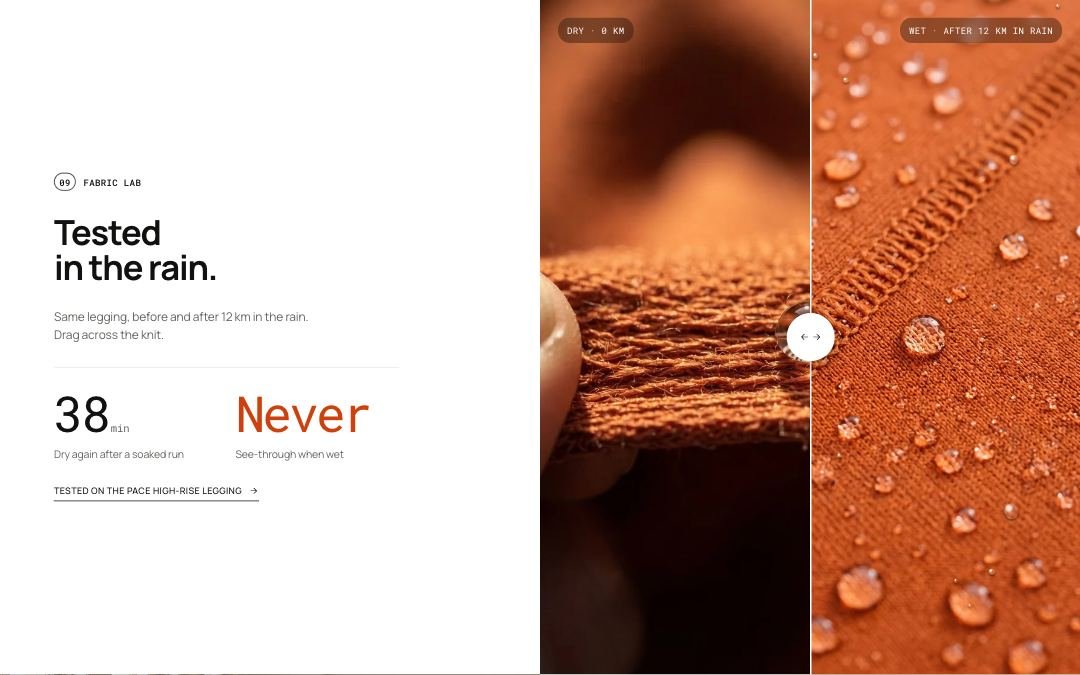 Before and afterA before and after slider next to a heading, two stats and a link to the tested product. Shoppers drag across the photo to compare the two states, such as dry and wet fabric.Guide →
 Fit finderA short quiz with one activity choice and two answer scales that shows the best matching product next to a photo for that activity. The answers are saved as the shopper's fit profile.Guide →
 Kit builderA step-by-step kit builder. Shoppers move through steps such as Top, Bottom and Layer, add pieces, watch the kit total, and add everything to the cart at once.Guide →
 Drop countdownA launch section with a large photo, a live countdown to a start date, a Notify me email field and the pieces in the drop with their prices.Guide →
 TestimonialsA side-scrolling row of customer quotes, each with a photo, name, detail line and a link to the product they wear. An optional press row scrolls slowly underneath.Guide →
 Distance storyA scrolling story told along a race distance. On desktop the section stays in place while a counter runs up to the total distance and each mark takes over with its own text, product and background photo.Guide →
 Blog postsA heading and a row of the latest posts from one blog, with a link to the full blog.Guide →
 Video bannerA full-screen banner with a looping muted video or a photo. Its content is blocks: label, heading, text, buttons, a countdown and a product card, in any order. The banner links to a collection or a page.Guide →
 Social wallPhoto, video and quote tiles that link to your social posts or profile, as a grid, a wall, a carousel or a slowly scrolling strip, with a heading and short intro.Guide →
Other demo pages
The other templates in the demo and the sections on each, top to bottom. Select a section for its guide.
| Page | Sections used, top to bottom |
|---|---|
| Product page | Product information, Product details, Feature strip, Performance profile, Pocket map, Length guide, Style with, Product reviews, Product compare, FAQ, Recently viewed |
| Gift card product | Product information, Recently viewed |
| Collection page | Collection banner, Product grid, Collection description, Collection doors |
| All collections | Collections list |
| Search results | Search results |
| Compare products | Compare table |
| Cart page | Cart |
| Journal (blog) | Blog posts |
| Journal article | Blog post, Related stories |
| About | Story hero, Manifesto, Word definition, Process steps, Product rules, Fabric library, Made to last, Team, Club run |
| Contact | Contact page, Social wall |
| FAQ | FAQ page |
| Shipping and returns | Page, Call to action |
| Campaign page | Story hero, Pocket map, Performance profile, Product compare, Style with |
| Standard page | Page, Call to action |
| Page not found (404) | 404 page, Featured collection |
| Password page | Password page |
Was this page helpful? No, ask support
Still stuck?
Contact supportSend us a screenshot and your store link. We reply within two business days.