Theme settings
Social media and store information
Links to your profiles, and your contact details in one place for the footer, the Contact page and search engines.
Open Theme settings → Social media and paste the full address of each profile. Empty ones are hidden. There are fields for Instagram, TikTok, YouTube, Strava, Facebook, Pinterest, Snapchat, X, Threads, Tumblr, Vimeo, LinkedIn, WhatsApp and Telegram. Space between icons sets the gap between the icons in the footer and the phone menu; the footer's own Icon size makes them smaller or larger.

Theme settings → Social media
| Setting | Type | Default | What it does |
|---|---|---|---|
| Text | — | ||
| TikTok | Text | — | |
| YouTube | Text | — | |
| Strava | Text | — | |
| Text | — | ||
| Text | — | ||
| Snapchat | Text | — | |
| X | Text | — | |
| Threads | Text | — | |
| Tumblr | Text | — | |
| Vimeo | Text | — | |
| Text | — | ||
| Text | — | ||
| Telegram | Text | — | |
| Space between icons | Slider 0–24px | 8px | |
| Share buttons | |||
| Checkbox | On | ||
| Checkbox | Off | ||
| Telegram | Checkbox | Off | |
| Checkbox | On | ||
| Checkbox | On | ||
| X | Checkbox | On | |

Four profiles filled in: their icons show under the footer's newsletter. The Brand column of the footer can show them too
The same icons sit at the bottom of the phone menu. To share a product, shoppers use Share on the product page, which offers the share buttons below, copy link and, on phones, the device's own share menu.
Share buttons
Pick which ways to share show in the product page's share pop-up and beside blog posts: Email, WhatsApp, Telegram, Pinterest, Facebook and X. Copy link is always there, and phones also offer their own share menu, which reaches every app on the device. A Pinterest share uses the product's first photo, or the post's image.
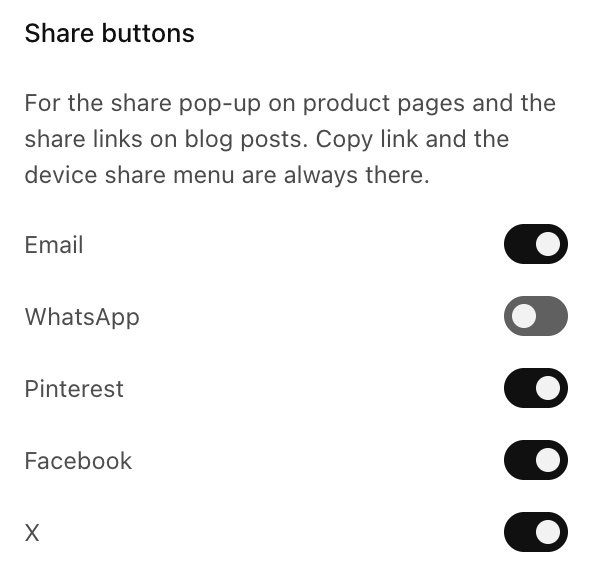
Theme settings → Social media → Share buttons: WhatsApp off, the others on, as in the demo
Store information
Open Theme settings → Store information and enter your email, phone, address, map link and opening hours once. They fill every place whose own field is empty:
- the footer Contact column (email, phone, address and hours),
- the Contact page: the address and its Directions link, and the email, phone and address items left empty,
- the home page's description of your store for search engines.
Change a number here and it changes everywhere at once. A field filled in a section keeps its own text, for example a second phone line for wholesale.
| Setting | Type | Default | What it does |
|---|---|---|---|
| Text | — | Empty uses your store’s contact email. | |
| Phone | Text | — | |
| Address | Text | — | |
| Map link | Link | — | For example your Google Maps page. Empty: the Directions link searches your address. |
| Opening hours | Text | — |
Send us a screenshot and your store link. We reply within two business days.