Sections / Product page sections
Length guide
A leg drawing with a height slider that shows about where each length, such as bike short, 7/8 or full length, ends on the shopper. Use it on product pages for leggings and shorts sold in several lengths.
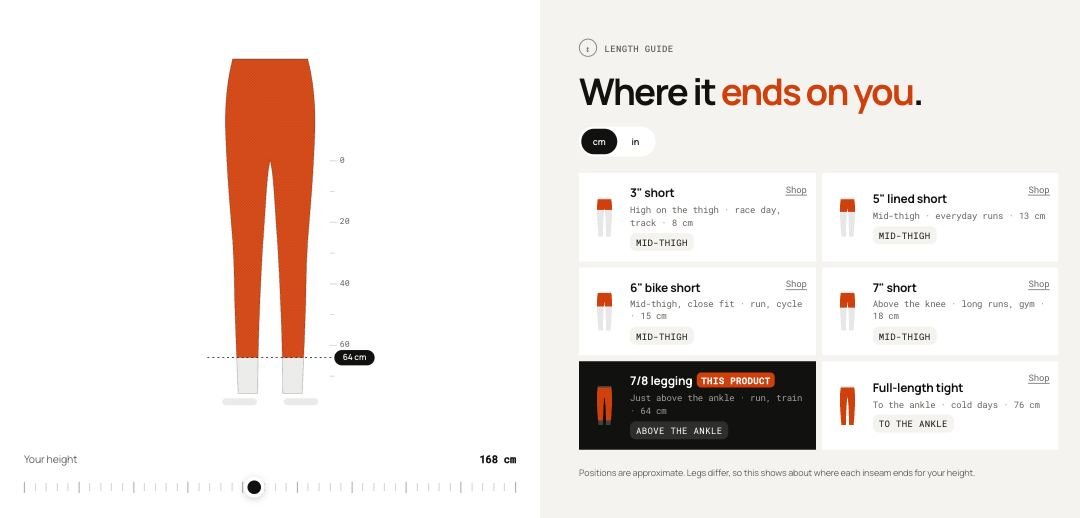 Storefront · desktop
 Storefront · phone
Add the section
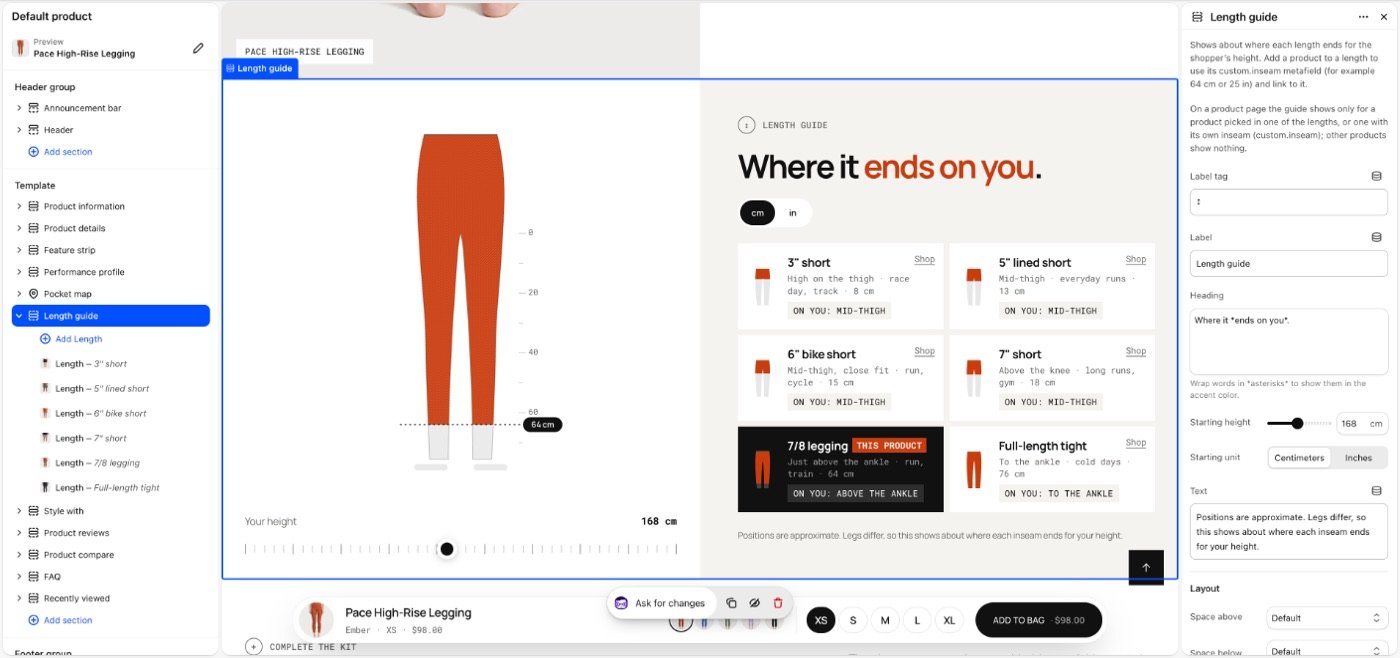
Length guide selected in the theme editor: its blocks in the list on the left, its settings on the right.
- In the theme editor, open the page you want it on, for example Home page.
- Select Add section and choose Length guide.
- Select Add block to add Length.
- Fill in the settings below, then Save.
In the demo store: product, product.one-column, product.thumbnails-below, product.thumbnails-beside.

Section settings
| Setting | Type | Default | What it does |
|---|---|---|---|
| Label tag | Text | ↕ | |
| Label | Text | Length guide | |
| Heading | Text | Where it *ends on you*. | Wrap words in asterisks to highlight them. Their look comes from Theme settings → Text styles → Highlighted words. |
| Starting height | Slider 140–200cm | 168cm | |
| Starting unit | Choice | Centimeters | Options: Centimeters, Inches. |
| Text | Text | Positions are approximate. Legs differ… | |
| Layout | |||
| Space above | Choice | Default | Options: Default, None, Small, Medium, Large, Custom. |
| Space below | Choice | Default | Default follows Theme settings > Layout > Space between sections and lets edge-to-edge bands touch. Small, Medium and Large are half, equal to and one and a half times that spacing. Options: Default, None, Small, Medium, Large, Custom. |
| Space above | Slider 0–200px | 80px | |
| Space above on phones | Slider 0–200px | 56px | |
| Space below | Slider 0–200px | 80px | |
| Space below on phones | Slider 0–200px | 56px | |
| Divider above | Choice | None | Waves and curves cut into the edge of a section with its own color scheme or a background; a line works on any section. Options: None, Line, Wave, Curve out, Curve in. |
| Divider below | Choice | None | Options: None, Line, Wave, Curve out, Curve in. |
| Show on | Choice | All devices | Desktop means screens 990px and wider. A hidden section stops its timers and videos and does not load its images; in the theme editor it stays visible, faded, so you can edit it. Options: All devices, Desktop only, Mobile and tablet only. |
| Heading | |||
| Heading size | Choice | Default | Options: Default, Small, Medium, Large, Display. |
| Heading tag | Choice | Auto | Changes meaning for search engines and screen readers, not the look. Auto uses H2. Choose H1 only for the main title of a page, such as a home page hero. Options: Auto, H1, H2, H3. |
| Appearance | |||
| Color scheme | Color scheme | Scheme 1 | |
Note Shows about where each length ends for the shopper’s height. Add a product to a length to use its custom.inseam metafield (for example 64 cm or 25 in) and link to it.
Note On a product page the guide shows only for a product picked in one of the lengths, or one with its own inseam (custom.inseam); other products show nothing.
Blocks
Up to 8 blocks.
Length
| Setting | Type | Default | What it does |
|---|---|---|---|
| Title | Text | Full length | |
| Text | Text | To the ankle | How this length is meant to sit, or what it's for. Where it ends on the shopper is worked out from their height and shown as "On you". |
| Inseam | Slider 5–90cm | 71cm | |
| Product | Product | — | Optional. Its custom.inseam value replaces the inseam above. On that product’s page, this length starts selected. |

Tip Link a product to a length so its page opens with that length selected and the other lengths link to their products. The product's custom.inseam metafield (for example 64 cm or 25 in) replaces the block's inseam.
Tip The shopper's height and unit are remembered in their browser.
Limitations and troubleshooting
- On a product page it only shows for products linked to a length or with their own custom.inseam.
- Positions are approximate: the inseam is taken as 0.45 of the shopper's height.
- Up to 8 lengths.
Related: Performance profile · Product compare · Fit finder
Was this page helpful? No, ask support
Still stuck?
Contact supportSend us a screenshot and your store link. We reply within two business days.